Advanced SystemCare (Freeware ) Download
Free registry repair and cleaner - Advanced SystemCare Free. What does it help? Slow down, freeze, crash and security threats are over. Advanced SystemCare Free is a comprehensive PC care utility that takes an one-click approach to help protect, repair and optimize your computer. Scanning and finding what other utilities miss, it can keep your PC error-free and smooth than ever. This fantastic program is available free of charge.
Why Advanced SystemCare Free?
New PC Performance - Do you remember the feeling of a brand new PC when you first bought it? Why not try Advanced SystemCare Free, a free PC tune-up utility that focuses on the performance of your PC.
Computer Crashes without Reason - Have you ever encountered your PC crashes and you even did not know why. After months or years of using your PC, there might be plenty of changes, which added burdens to your PC but never get cleaned. What Advanced SystemCare Free does is to clean the stuffs that are left over and clean craps to make your PC neat and clean.
Registry Repairing and Cleaning - As an elementary part to a PC, if it does not working well, then your computer will be in big trouble. What does Advanced SystemCare Free do? It cleans the records which is unnecessary to your PC but makes the PC running slow and produces troubles. It also repair parts that are missing and make the PC complete.

What's new in the new version?
+ Added NetworkMon Beta
+ Improved Defrag compatibility with SSD
+ Improved Registry Fix module
+ Improved update check
* Fixed general bugs
Why Advanced SystemCare Free?
New PC Performance - Do you remember the feeling of a brand new PC when you first bought it? Why not try Advanced SystemCare Free, a free PC tune-up utility that focuses on the performance of your PC.
Computer Crashes without Reason - Have you ever encountered your PC crashes and you even did not know why. After months or years of using your PC, there might be plenty of changes, which added burdens to your PC but never get cleaned. What Advanced SystemCare Free does is to clean the stuffs that are left over and clean craps to make your PC neat and clean.
Registry Repairing and Cleaning - As an elementary part to a PC, if it does not working well, then your computer will be in big trouble. What does Advanced SystemCare Free do? It cleans the records which is unnecessary to your PC but makes the PC running slow and produces troubles. It also repair parts that are missing and make the PC complete.

What's new in the new version?
+ Added NetworkMon Beta
+ Improved Defrag compatibility with SSD
+ Improved Registry Fix module
+ Improved update check
* Fixed general bugs

Make a new Personal Profile for Social Networking
It had been a long time since I posted anything . So at last , today I decided to Post something interesting !!!
Actually I was on another important project www.tpltharad.co.cc
Now I decided to come back to my home i.e. Abhi Software Tips. :)
Here I had got a new website (Social Networking Site). About.me
You should Sign up quickly to build your personal profile page that points users to your content from around the web.
Its Free of Cost.
Visit my Profile www.about.me/abhishek.vohera .

They says -Actually I was on another important project www.tpltharad.co.cc
Now I decided to come back to my home i.e. Abhi Software Tips. :)
Here I had got a new website (Social Networking Site). About.me
You should Sign up quickly to build your personal profile page that points users to your content from around the web.
Its Free of Cost.
Visit my Profile www.about.me/abhishek.vohera .

We designed about.me for ourselves
A lot of us have multiple online profiles scattered across various services, including Facebook, LinkedIn, Flickr, and Twitter. And one problem we face is pulling all of this information together to build a single on-line identity — be it for personal use, or to create a professional on-line profile. We've focused on enabling you to:
Create your personal splash page
Quickly build a personal and dynamic splash page that points visitors to your content from around the web.
Have fun with the numbers
Understand how many people see your profile, where they're coming from, and what they do on your page.
Change Windows 7 Logon Screen With Ease.
Everybody watches a default logon screen when they log on ...
Isn't is Boring !!
So I found a method to change the log on screen in windows 7.
Steps :-
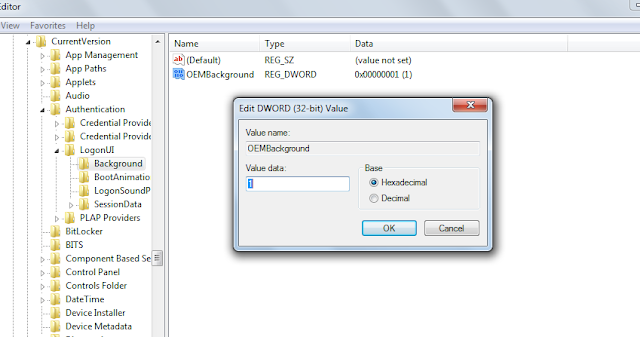
* Fire up registry editor (Win Key + R and then type regedit, hit enter)
* Browse HKEY_CURRENT_USER\Software\Microsoft\Windows\CurrentVersion\Authentication\LogonUI\Background , double click on key named OEMBackground and change its value to 1 (If you cannot find the path or the key go ahead and create it, remember OEMBackground is a Dword)

Isn't is Boring !!
So I found a method to change the log on screen in windows 7.
Steps :-
* Fire up registry editor (Win Key + R and then type regedit, hit enter)
* Browse HKEY_CURRENT_USER\Software\Microsoft\Windows\CurrentVersion\Authentication\LogonUI\Background , double click on key named OEMBackground and change its value to 1 (If you cannot find the path or the key go ahead and create it, remember OEMBackground is a Dword)

- You just enabled the OEM Background functionality. Now browse to the folder
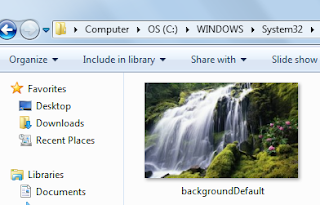
C:\WINDOWS\System32\oobe\info\backgrounds. Again the folder path may not exist already, so you can go ahead and create required folders (info and backgrounds are generally not present)

- Now put in any JPG file with size less than 256 kb in this folder and rename it to backgroundDefault.jpg. This file will be stretched to fit the screen, so you would want it to match the resolution of your screen so that image doesn’t look bad.
- If you are unable to do so , there is a another method for you .

Free SMS India & International v1.0 New!

Futures:
- No Signup required
- India & International Support
- Indian Language Support (Google Indic Transliteration)
- Quick Send
- Handy Web Based Portable Tool
Virus Scan Report:

mediafire link updated! 100% Clean

What actually a Virus is ???
 Have you ever ask your self that question befor? well here i am going to show you the basic of what a virus really is. A virus is a piece of code so will try to do wierd actions on your computer. Copy itselfs to diffrent places on the computer is the most commont action it will do. They may attach it self to a spesifc program or spesifc file type. The importent part to a virus is to survive as long as Possible. The writters to the virus want it to stay alive. What a virus will do is try to gain access to the system of the computer to take control over important Functions of the system. This is how a virus will try to stay alive. Some viruses may also try to attack Threats as AV's disable important functions like "Task Manager" so you can't turn off the Processes the virus is running in.
What i mean about important Functions is like "System Restore" ect this can restore the computer to a later condition. So to mabye delete all the restore points or even disable it from the user to use it. Viruses are much more harder to get ride of if they are Executed on the victems computer since than they can use hiding Techniques to try avoid to get detected by the AV's. They will most likely try to not exist on the computer. Since they are trying to merge with virus free programs so are legaly. Also they can try to Deny access to files they are hiding in so the AV's can't open them up. This is just few Techniques they will try to use to stay hidden on the victems computer. So you should always scan files befor you execute them.
So how can they really take away important Functions on the computer like "Task Manager"? Every function to the computer is saved in something called registry. So viruses will normaly do alot of changs there to take out functions so are important to the computer and user. Normal computer users without knowledge about registry are'nt able to turn thos needed Functions like Task Manager on again. There is alot of persons out there in the World so don't even know about how this really works. Think about every Person on the Earth nearly all have a computer so they have access to at home? But have they really any knownledge about the threats and how to deal with them? Answers is No!. So this is why its so very big risk for so many to get infected since they are'nt really prepared about the threats out there so are hiding in every single corner when you surf on the internet. They are'nt taking the Alert on how bad it really is. When they are download something they are't even beliving that it might be a threat? Are they even scan the Files befor they execute them? I think No! All thos problems would'nt be so big if peoeple really open up there eyes and took a look at whats going an.
What ever all the AV's and Security stuff poeple are making. It wont stop the threats as viruses and unwated programs will still be everywhere but if poeple just stopped up for one second and started to be abit more carefully about what they are doing on the Internet they might not be as so big risks as they are today. Just with simple few steps they can avoid to get infected.
HOW CAN I GET INFECTED?
- Downloading Software
- Clicking on Pop up windows
- Clicking on Attachments via E-Mail
- Have't patched up the computer
- Surfing on Unsecure Sites
- Entering unsecure IRC rooms
- Clicking on Links so you may get from "Messenger" or "E-Mail"
Here you see a few ways you can get infected with viruses. So as you see its very easy get it. But if you just thinking about what you are doing on the computer you can easy avoid alot of virus infections. Many Poeple may ask what is the best protection? There are't any program so can give you 100% secure computer. Best AV's you have on your computer is "You".
How to use Google for hacking !!!
Google serves almost 80 percent of all search queries on the Internet, proving itself as the most popular search engine. However Google makes it possible to reach not only the publicly available information resources, but also gives access to some of the most confidential information that should never have been revealed. In this post I will show how to use Google for exploiting security vulnerabilities within websites. The following are some of the hacks that can be accomplished using Google.
1. Hacking Security Cameras
There exists many security cameras used for monitoring places like parking lots, college campus, road traffic etc. which can be hacked using Google so that you can view the images captured by those cameras in real time. All you have to do is use the following search query in Google. Type in Google search box exactly as follows and hit enter
inurl:”viewerframe?mode=motion”
Click on any of the search results (Top 5 recommended) and you will gain access to the live camera which has full controls. You will see something as follows

As you can see in the above screenshot, you now have access to the Live cameras which work in real-time. You can also move the cameras in all the four directions, perform actions such as zoom in and zoom out. This camera has really a less refresh rate. But there are other search queries through which you can gain access to other cameras which have faster refresh rates. So to access them just use the following search query.
intitle:”Live View / – AXIS”
Click on any of the search results to access a different set of live cameras. Thus you have hacked Security Cameras using Google.
2. Hacking Personal and Confidential Documents
Using Google it is possible to gain access to an email repository containing CV of hundreds of people which were created when applying for their jobs. The documents containing their Address, Phone, DOB, Education, Work experience etc. can be found just in seconds.
intitle:”curriculum vitae” “phone * * *” “address *” “e-mail”
You can gain access to a list of .xls (excel documents) which contain contact details including email addresses of large group of people. To do so type the following search query and hit enter.
filetype:xls inurl:”email.xls”
Also it’s possible to gain access to documents potentially containing information on bank accounts, financial summaries and credit card numbers using the following search query
intitle:index.of finances.xls
3. Hacking Google to gain access to Free Stuffs
Ever wondered how to hack Google for free music or ebooks. Well here is a way to do that. To download free music just enter the following query on google search box and hit enter.
“?intitle:index.of?mp3 eminem“
Now you’ll gain access to the whole index of eminem album where in you can download the songs of your choice. Instead of eminem you can subtitute the name of your favorite album. To search for the ebooks all you have to do is replace “eminem” with your favorite book name. Also replace “mp3″ with “pdf” or “zip” or “rar”.
I hope you enjoy this post. Pass your comments. Cheers! :)
Google Search with the help of Goosh
Do you know about the unofficial Google shell.This a site which let you to search google in new way.If you have some experience with linux and unix you will love it.This is a google-interface behaves similar to a unix-shell.You type commands and the results are shown on this page.
Goosh is written by Stefan Grothkopp

This is NOT an official google product!
Goosh is open source under the Artistic License/GPL.
Click here to check this
http://goosh.org/
http://goosh.org/#abhisoftwaretips.blogspot.com
Goosh is written by Stefan Grothkopp

This is NOT an official google product!
Goosh is open source under the Artistic License/GPL.
Click here to check this
http://goosh.org/
http://goosh.org/#abhisoftwaretips.blogspot.com
How to Get Facebook Email Address
Facebook has just new features in which it will give email addresses to users ,at this time facebook email id is not open to everyone ,you have to request invittation.In order to get a invite to this new service you need to visit following link where in you would be asked to click on the ‘Request Invite’ button.
http://www.facebook.com/about/messages/
 if you are lucky you will get the yourname@facebook.com email id as soon as possible .Please note that Your email address will match your public username, for example:
Profile: facebook.com/username
Then your email address will be
Email: username@facebook.com
If you don’t have a username you can go here facebook.com/username/ to get or click below
http://www.facebook.com/username/
http://www.facebook.com/about/messages/
Profile: facebook.com/username
Then your email address will be
Email: username@facebook.com
If you don’t have a username you can go here facebook.com/username/ to get or click below
http://www.facebook.com/username/
Password Meter : Check Passwords for Strength
Are you sure your online passwords meet minimum requirements? If you use the same password for all web accounts, like many of us do, you better make sure that it is strong. Password Meter is a web-based password checker that can help you with that. Not only you it can test your existing password for strength but also provide guidelines for creating stronger passwords. It calculates positive and negative factors using its own weighting algorithms and comes up with the number that corresponds to potential strength of your password.

Features
Check out PasswordMeter @ [ www.passwordmeter.com ]
Features
- Generate strong passwords.
- Weighing algorithm: Calculates the strength of your password based on a number of factors.
- Detailed table showing password guidelines and strength affecting factors.
- No registration or email required
Check out PasswordMeter @ [ www.passwordmeter.com ]
Cannot delete file , Here is the Solution via Unlocker
You probably sometimes try delete file and suddenly appear message like this:cannot delete file, access is denied, the source or destination file may be in use and etc. Don´t worry, in this tutorial we will see few methods that can help.
For example , you have file problems.exe and you cannot delete that file. Lets say that directory path for problem.exe is c:\folder\problems.exe . Open Notepad and write del /F “c:\folder\problems.exe” and save file like killfile.bat on C:

Then go to Control Panel -> Sheduled Tasks -> Ad Sheduled task
When scheduled task wizard appear click Next

Then click Browse and choose killfile.bat
 Choose When my computer starts and click Next
 Enter username and password, Next
 Click Finish and Restart Computer .After this file will be deleted.
Other solution for this problem is "Unlocker" It is simple and useful applications , that will help to get rid of error message like Error deleting file or folder, cannot delete folder…
For example , you have file problems.exe and you cannot delete that file. Lets say that directory path for problem.exe is c:\folder\problems.exe . Open Notepad and write del /F “c:\folder\problems.exe” and save file like killfile.bat on C:

Then go to Control Panel -> Sheduled Tasks -> Ad Sheduled task
When scheduled task wizard appear click Next

Then click Browse and choose killfile.bat


Other solution for this problem is "Unlocker" It is simple and useful applications , that will help to get rid of error message like Error deleting file or folder, cannot delete folder…
Backup Your Mozilla Firefox With MozBackup
MozBackup is a free utility that will backup Mozilla applications including the following programs:
* Firefox
* Thunderbird
* Sunbird
* Flock
* Postbox
* SeaMonkey
* Mozilla Suite
* Spicebird
* Songbird
* Netscape
* Wyzo

 You also get the option to password protect your backup.


 The process is fairly identical for other Mozilla programs just with different options.
MozBackup can be downloaded here for free.
and also from here >>>Download<<<
* Firefox
* Thunderbird
* Sunbird
* Flock
* Postbox
* SeaMonkey
* Mozilla Suite
* Spicebird
* Songbird
* Netscape
* Wyzo
When you run MozBackup it shows what Mozilla applications are on your computer and lets you choose which one you want to backup.

Next it gives you the backup options which will vary depending on what application you are backing up. These examples are for a Thunderbird backup. You will get an option to choose where to store your backup as well.


MozBackup can be downloaded here for free.
and also from here >>>Download<<<
Beginners Guide to Search Engine Optimization - Free E-book
If your focus is to learn more about Search Engine Optimization, and need an introductory explanation, the Beginners Guide to Search Engine Optimization is a great place to start.

The guide covers the basic terms, explains how it all works, and tells you what you need to do to make use of these concepts on your own website.
There is no official direct link to download the book, but rather can have it emailed to you by submitting your email here.
But for your convenience i had got it for you >>>Download<<<

The guide covers the basic terms, explains how it all works, and tells you what you need to do to make use of these concepts on your own website.
There is no official direct link to download the book, but rather can have it emailed to you by submitting your email here.
But for your convenience i had got it for you >>>Download<<<
TeraCopy - Copy at Max Speed
TeraCopy is a compact program designed to copy and move files at the maximum possible speed, providing the user with a lot of features:


- Copy files faster. TeraCopy uses dynamically adjusted buffers to reduce seek times. Asynchronous copy speeds up file transfer between two physical hard drives.
- Pause and resume file transfers. Pause copy process at any time to free up system resources and continue with a single click.
- Error recovery. In case of copy error, TeraCopy will try several times and in the worse case just skip the file, not terminating the entire transfer.
- Interactive file list. TeraCopy shows failed file transfers and lets you fix the problem and recopy only problem files.
- Shell integration. TeraCopy can completely replace Explorer copy and move functions, allowing you work with files as usual.
- Full Unicode support.
- Windows 7 x64 support.
Google Publishes an eBook
The nature of the Internet doesn't exactly make for an exciting bedtime story, but that's how Google is presenting "20 Things I Learned About Browsers and the Web."

Google's Chrome team wrote the e-book in HTML5, presented as interactive pages that you can fold and flip by clicking and dragging the mouse. The book is fun to read, at least for a little while, and educational if you're not a know-it-all. It advocates for updating to a modern Web browser (i.e., not IE6) and argues that plug-ins are relics (unless they're integrated into the browser itself, as Chrome does with Adobe Flash).

The topis covered in this book are as follows :-
Must read it once!!!

Google's Chrome team wrote the e-book in HTML5, presented as interactive pages that you can fold and flip by clicking and dragging the mouse. The book is fun to read, at least for a little while, and educational if you're not a know-it-all. It advocates for updating to a modern Web browser (i.e., not IE6) and argues that plug-ins are relics (unless they're integrated into the browser itself, as Chrome does with Adobe Flash).

The topis covered in this book are as follows :-
- What is the Internet
- Cloud Computing
- Web-Apps
- HTML,Javascript,Css , etc
- HTML 5
- 3D in Browser
- A Browser Madrigal
- Plug-Ins
- Browser Extension
- Synchronizing the browser
- Browser Cookies
- Browsers and Privacy
- Malware,phishing and security risks
- Browser protection from Malware and Phishing
- Using web-address to stay safe
- IP addresses and DNS
- Validating Identities Online
- Evolving to a faster web
- Open Source and Browsers
- 19 things Later...
Must read it once!!!
Best 10 add-ons for Mozilla’s Firefox
Mozilla’s Firefox browser burst onto the web landscape a few years ago, and unlike IE, Firefox is doing it right.
In fact, the popularity of Firefox has grown significantly, and when you consider that this browser competes with Microsoft’s Internet Explorer and Google’s Chrome, the success of Firefox is proof that Mozilla got it right by introducing a blank-slate browser that you customize to make your own.
Firefox supports a large, diverse and active community of independent developers. Visit the add-ons page at Mozilla and you’ll discover hundreds of features you can add to Firefox, enabling you to customize Firefox to your business needs, web cruising practices and personal preferences.
Ever since Firefox launched, Mozilla has promoted the browser as user-centric – a lesson every site owner can take to the bank. Engage your users and they become a digital community.
I use a number of browsers for different purposes, but I always come back to Firefox for routine web-based activity. And, by downloading add-ons, I’ve created a browser that meets my needs so my Firefox search page looks different from your search page, thanks to the roster of add-ons offered by Firefox.


1. FastestFox 3.0.4
This productivity app is fairly new, but man, has it caught the attention of Firefox users. I can’t believe how this one app improves the performance of any computer from 5-year-old doorstops to today’s high-speed processors and a terabyte of RAM .
FastestFox simplifies repetitive tasks. Program the interface once and daily chores can be automated – everything from time cards to content management. Downloads are faster, even when I’m downloading two or three batches of digital data simultaneously.
This handy little tool can also run in the background if you don’t need all the bells and whistles by increasing speed as you move from one site to another. I’m still discovering new ways to use this app. It’s flexible, deep in features and it’s a simple add-on to the blank Firefox interface.
2. Google ShortcutsWith Google apps moving aggressively into the exclusive activities of the world wide “wealth” of Microsoft, there’s a lot of Google tools I want access to daily – everything from my Analytics account to Google Docs.
This handy download let’s me place all my critical Google tools on a single menu. Click once and I’m deep in my Google account, or conducting research with Google’s Keyword Generator.
It’s a simple navigation tool that takes a few clicks out of my work day and those clicks add up. So, it improves my productivity, too, providing faster access to the Google tools I use everyday. Hey, save a click here, a click there – it adds up to increased productivity.
3. Yoono 6.2.1If you’re like me, social media takes up a big part of the day. Sites like Twitter, Facebook, LinkedIn, Flickr and other digital gathering and SMS sites are a great way to create web or blog buzz. And isn’t that what we’re all trying to do?
Yoono is in my arsenal of guerrilla marketing tools, enabling me to ping posts, add posts to a variety of sites and track return activity such as RTs and comments to posts – all from one dashboard. Think of Yoono as a blend of Ping.fm and Seesmic – only mashed together in functionality. Real simple interface, too.
4. Smart Bookmarks Bar 1.4.3If you’re like me you’ve got a couple of hundred bookmarks in your favorites file. Well, if you’re tired of searching for your destination sites, Smart Bookmarks enables you to display more bookmarks on your navigation bar.
You can hide it and bring it up as needed, but it’s so convenient, I keep it on-screen all the time so I’m on any site with a click. That’s just how I want it.
5. MR Tech Toolkit 6.0.4A simple download add-on that delivers all the tools I need to install, manage and change extensions and Firefox themes and other add-ons in a variety of formats and from a simple interface.
Makes download management more manageable. Another time saver for me.
6. AutoPager 0.5.5.6Simple idea, simple add on. AutoPager automatically loads next pages based on your preferences and web use practices. It reads Google, Yahoo and interfaces with other Firefox add-ons like spam blockers so you can still skip the spam without having to manually load the next page into your Firefox browser. This little tool does it for you.
Think of AutoPager as an infinite scrolling tool and stop manually clicking to the next page. Scroll through an entire site in seconds.
7. RSS Ticker 3.0.4I’ve got over 100 blogs and sites loaded into four different RSS readers so sometimes finding the news takes more time than I want to spend.
That’s why I added RSS Ticker – a convenience overlay that notifies me of changes in any of the live bookmarks I place in the tracker. Now, I don’t have to manually track RSS readers. This add-on does it for me.
8. FEBE 6.3.2A security add on that automatically backs up all my Firefox activities – bookmarks, preferences, passwords and other stuff that I use everyday.
Sure, I have multiple, redundant back-up systems off-site and in-house. This Firefox add-on simply takes one more thing off my plate – one more thing I don’t even have to think about. Nice back up security for all your Firefox add-ons and settings.
9. View Source Chart 2.7One of the most creative uses of Firefox’s OSS interface, View Source Chart provides the source code of any site in a very simple GUI. But it’s not just a click saver.
View Source displays HTML tag boundaries, provides a GUI of tag nesting configurations and even identifies a page element’s ancestor tags – all on one screen and all with a click.
If site performance analysis is part of your profession (you’re an SEO, SEM, web copy writer, site designer, etc.) this little add-on, which I keep loaded on my main toolbar, will make your market analysis activities more productive and effective. Highest recommended for web professionals.
10. Greasemonkey 0.8.2The Greasemonkey team’s main add-on, just called Greasemonkey, allows me to create web displays using snippets of JavaScript. You can grab Greasemonkey-compatible scripts here or create your own Greasemonkey scripts by mashing scripts to suit your needs. If you don’t know diddly about JavaScript, here’s everything you need to know to create a truly unique browser using this very sweet little time-saver.
With such an active community of developers, building literally thousands of Firefox add-ons, and new releases coming out daily, bookmark the Firefox add-ons site.
7 ways to work faster on slow net connections.
There is nothing like trying to work when your Internet connection is slow. It’s tougher to send email, more difficult to send files to co-workers, and it’s frustrating wasting time while you wait for web pages to appear. And even with the proliferation of broadband Internet connections, there are still times you may be working on a slow connection. You might be traveling, working out of your office, still using dial-up, or your broadband connection may be acting up. But there are things you can do.
This article will show you how to increase your productivity when your connection is slow. Many of these steps are also good tips for how to increase the speed of browsing and sending and receiving email.

1. Send multiple files faster by compressing them
If you’re sending multiple files for example several files related to a project you can reduce their combined size by using a compression utility. Compressing your files can dramatically reduce the time needed to send files online, and won’t take up as much space in your (or the recipient’s) email Inbox. WinZip is one of the more common compression tools.
2. Speed browsing by turning off graphics in Internet Explorer
Graphics are important to web pages, but they also take time to download if you’re online. You can turn them off to speed your Internet browsing.
3. Send email using distribution lists
If you’re sending an email to multiple people, create a distribution list instead of listing each recipient separately. Messages are sent faster and more efficiently when you’re using a distribution list. Your company may have established procedures for creating mailing lists.
4. Work offline using Cached Exchange Mode in Outlook
Even if you lose your network connection, you can continue to working in Outlook if you’re using Cached Exchange Mode. With Cached Exchange Mode, a copy of your mailbox is stored on your computer. This copy provides quick access to your data and is frequently updated with the mail server. If you work offline, whether by choice or due to a connection problem, your data is still available to you instantly wherever you are. Cached Exchange Mode does require you to work with a Microsoft Exchange Server email account.
5. Reduce email size with simple email signatures
Email signatures leave a professional stamp on your messages, but elaborate signatures that include multiple images take up a lot of unnecessary storage space in each email. Ultimately, they can slow down the time needed to send each message. Instead create distinctive text signatures combining fonts, type sizes, and colors to make your email signature smaller and quicker to transmit and receive.

6. Browse offline by saving web pages on your computer
If you use reference a web page often, save it locally to your computer. If you lose your connection or are working on a slow connection, you’ll still be able to read and find the information you need.
7. Open web pages faster by increasing your cache
If you increase the size of the Temporary Internet files cache in Internet Explorer, your computer won’t have to work so hard when you revisit web pages. Many of the images will already be downloaded on your computer, decreasing the amount of time it takes to open a page.
You can also use HTTrack software to save webpages on pc.
- Abhishek Vohera

This article will show you how to increase your productivity when your connection is slow. Many of these steps are also good tips for how to increase the speed of browsing and sending and receiving email.
1. Send multiple files faster by compressing them
If you’re sending multiple files for example several files related to a project you can reduce their combined size by using a compression utility. Compressing your files can dramatically reduce the time needed to send files online, and won’t take up as much space in your (or the recipient’s) email Inbox. WinZip is one of the more common compression tools.
2. Speed browsing by turning off graphics in Internet Explorer
Graphics are important to web pages, but they also take time to download if you’re online. You can turn them off to speed your Internet browsing.
3. Send email using distribution lists
If you’re sending an email to multiple people, create a distribution list instead of listing each recipient separately. Messages are sent faster and more efficiently when you’re using a distribution list. Your company may have established procedures for creating mailing lists.
4. Work offline using Cached Exchange Mode in Outlook
5. Reduce email size with simple email signatures
Email signatures leave a professional stamp on your messages, but elaborate signatures that include multiple images take up a lot of unnecessary storage space in each email. Ultimately, they can slow down the time needed to send each message. Instead create distinctive text signatures combining fonts, type sizes, and colors to make your email signature smaller and quicker to transmit and receive.

6. Browse offline by saving web pages on your computer
If you use reference a web page often, save it locally to your computer. If you lose your connection or are working on a slow connection, you’ll still be able to read and find the information you need.
7. Open web pages faster by increasing your cache
If you increase the size of the Temporary Internet files cache in Internet Explorer, your computer won’t have to work so hard when you revisit web pages. Many of the images will already be downloaded on your computer, decreasing the amount of time it takes to open a page.
You can also use HTTrack software to save webpages on pc.
- Abhishek Vohera
Automatic Shortcut Viewer For Removable Storage Media In Desktop
You might have seen in Linux based OS like Ubuntu, whenever you insert a removable storage media in to your computer a shortcut to the storage device automatically appears in the desktop. If you are one of those who are keenly interested to get such feature in your Windows 7 or Windows XP or Windows Vista than have a rest on reading this article.
There are some free software that helps you to make this thing really possible. Upon researching various tools like these, I found one of them very useful and worthy to use.
This freeware I am talking about provide the user with automatic shortcuts to their USB and other drives that appear and disappear from the desktop as the user plugs their media in and out. The hero’s name is Desktop Media.
The best thing about this utility is that it uses very small amount of your Randomly Accessed Memory.

Besides usual removable media shortcuts you can also add network shortcuts and even shortcut to your fixed drive.
 To enable the plug and play shortcut just download and install the 300 KB file from the link below
Download the Desktop Media
The system tray icon will always show up in the system tray or notification area.

If you don’t want to see Desktop Media in system tray you can hide it from the options menu. Right click on the Desktop Media icon and choose Options, uncheck Show Tray Icon.

There are some free software that helps you to make this thing really possible. Upon researching various tools like these, I found one of them very useful and worthy to use.
This freeware I am talking about provide the user with automatic shortcuts to their USB and other drives that appear and disappear from the desktop as the user plugs their media in and out. The hero’s name is Desktop Media.
The best thing about this utility is that it uses very small amount of your Randomly Accessed Memory.
Besides usual removable media shortcuts you can also add network shortcuts and even shortcut to your fixed drive.

Download the Desktop Media
The system tray icon will always show up in the system tray or notification area.
If you don’t want to see Desktop Media in system tray you can hide it from the options menu. Right click on the Desktop Media icon and choose Options, uncheck Show Tray Icon.
RAR Password Recovery Magic 6.1.1.380
RAR Password Recovery Magic is a powerful tool designed to recover lost or forgotten passwords for a RAR/WinRAR archives. RAR password Recovery Magic supports the customizable brute-force and dictionary-based attacks.RAR Password Recovery Magic has an easy to use interface. All you need to do to recover your password is just to add your file to the operation window.

Key Features
Recover passwords for RAR/WinRAR archives.
Custom character set for "brute-force" attack supported.
You can select character from a range of character options including: Letters, Numbers, symbol...
Large wordlist dictionary.
Work in the background.
Features a user-friendly interface.
How to Use
RAR Password Recovery Magic is very easy to use. To recover a password, all you need to do is just to add your file to the operation window.
Step 1: Click "Open" button to open rar archive.
Step 2: Click "Setting" button to set desired parameters.
A - The set of characters available in the password. (letters only, numbers only, symbol only, letters and numbers...)
B - Select the password length (range) in "BruteForce" panel.
Step 3: Press the "Start" button to start recovery.

Key Features
Recover passwords for RAR/WinRAR archives.
Custom character set for "brute-force" attack supported.
You can select character from a range of character options including: Letters, Numbers, symbol...
Large wordlist dictionary.
Work in the background.
Features a user-friendly interface.
How to Use
RAR Password Recovery Magic is very easy to use. To recover a password, all you need to do is just to add your file to the operation window.
Step 1: Click "Open" button to open rar archive.
Step 2: Click "Setting" button to set desired parameters.
A - The set of characters available in the password. (letters only, numbers only, symbol only, letters and numbers...)
B - Select the password length (range) in "BruteForce" panel.
Step 3: Press the "Start" button to start recovery.
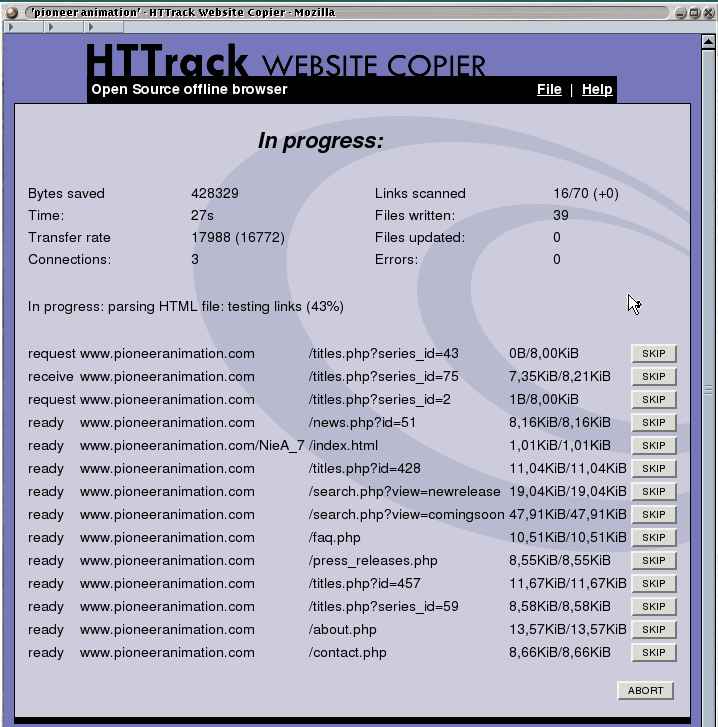
HTTrack - Keep a Copy of any Website In your PC for Offline mode
HTTrack is an impressive product that does what you want from a website ripper—download any website to your computer and then browse at your convenience. The entire website is there, the sub-directories, pictures, and internal links. Links to external websites are only active if you have an internet connection. HTTrack is compatible with all windows versions, and is GPL licensed freeware. WinHTTrack is the Windows release of HTTrack, and WebHTTrack is the Linux release. HTTrack can also update an existing mirrored site, and resume interrupted downloads. HTTrack is fully configurable, and has an integrated help system.
 |
| Screen Shot |
After a quick install you may start the program and select your language preference. You are then presented with a box to tell the program if you use a proxy for ftp transfers. If you do not use a proxy, just cancel and click "next" where you can give your project(s) a name and category. The default download folder is "C:\My Web Sites" so just click "next." Now you may paste in a URL for the website you wish to download. You may click on "Options" that will give a number of choices. These can also be accessed on the top menu through "Preferences." Click on "next" to get to the last screen to make any last choices before one last "next." Now you can watch HTTrack download the website.